

CATEGORY REFERENCE

micu189 App — Casino in Your Pocket

Download the micu189 app and carry live tables, slots and our sportsbook with you. Account access, real-time notifications and one-tap deposits wherever you are.

AndroidiOSAPK 28MBPush alertsFingerprint login
micu189 micu189 App — Casino in Your Pocket
micu189 What the App Brings to Your Phone

What the App Brings to Your Phone

The micu189 app strips away the browser lag. You get instant lobby load, biometric sign-in, and push notifications the moment a live table opens or a slot feature triggers. Deposit via DANA, OVO, GoPay or QRIS without re-entering your card details. Switch between live baccarat, Pragmatic slots and our sportsbook in one swipe. The app remembers your favourite rooms and your account

balance syncs in real time across all your devices.
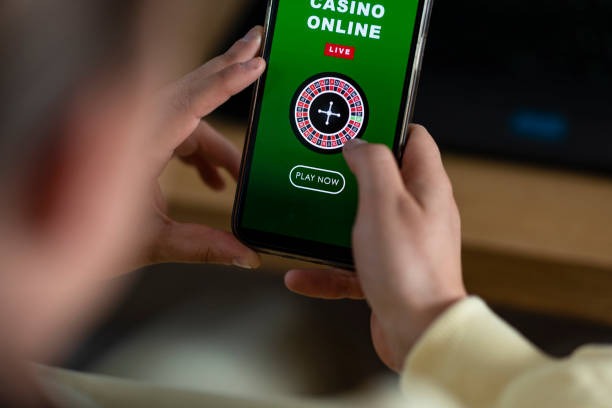
App Features Built for Speed

Instant Login

Fingerprint or face recognition gets you into your account in under two seconds. No password typing on a tiny screen.

Live Notifications

Push alerts tell you when your favourite live table goes live, when a slot bonus round starts, or when your withdrawal clears.

One-Tap Deposit

DANA, OVO, GoPay and QRIS are saved in your app wallet. Tap once and your balance updates instantly.

Dark Mode

Play late into the night without screen glare. Dark mode reduces battery drain and keeps your eyes comfortable.

Offline Lobby Preview

Browse game titles and room schedules even when your connection dips. Live tables load the moment you reconnect.

Quick Betslip

Build your sportsbook bets faster with a streamlined slip interface. Confirm and place in three taps.

micu189 Install in 3 Steps

Install in 3 Steps

Getting the micu189 app onto your phone takes less than a minute. Download the APK or grab it from your device's app store, allow installation from unknown sources if needed, then open and sign in with your micu189 account. You're live within seconds.

  • Download APK or App Store
  • Allow Unknown Sources (Android)
  • Open and Sign In
PLATFORM COMPARISON

Device Requirements

01

Android

Version 8.0 or higher. Minimum 2GB RAM, 50MB free storage. Supported in Indonesia and other regions where local law permits.

02

iOS

Version 14.0 or higher. iPhone 8 and newer. Minimum 60MB free storage. Available in supported regions.

03

Internet

4G or WiFi recommended for live tables. 3G works for slots and sportsbook, though live dealer streams may buffer.

04

Storage

App itself is 28–32MB. Cache grows over time; clear it monthly from your phone's app settings if needed.

05

Regions

Download available in Indonesia and supported territories. Your account region is set when you sign up.

MOBILE GAMING

Tour the App Screens

Swipe through the micu189 app and you'll see live table schedules, slot lobbies grouped by provider, your account balance, recent bets and a sportsbook tab that updates odds...

micu189 mobile gaming
Live lobby preview
Slot rooms by provider
Quick deposit widget
Account & transaction history
Sportsbook with live odds
Favourite games shortcut
PLAYER SUPPORT

Help When You Need It

In-App Support Chat Tap the help icon and chat with our team. Most replies come within two minutes during business hours.
Email Support Email [email protected] with your account username and issue. We respond within four hours.
Install & Login Guide Stuck on download or sign-in? Visit micu189.app/app-help for step-by-step screenshots and troubleshooting.
WHY THIS PLATFORM

Your App, Secured

Code Signed

Every micu189 app release is cryptographically signed. Your phone verifies the signature before installation.

Official Channels Only

Download from micu189.app, Google Play or the Apple App Store. Never from third-party app stores.

Encrypted Connection

All data between your phone and our servers travels over TLS 1.3. Your account details and deposits are never exposed.

Account Recovery

Lost your phone? Sign in on a new device and your account, balance and bet history are instantly restored.

Biometric Protection

Fingerprint or face unlock means only you can open the app, even if someone borrows your phone.

Session Timeout

App logs you out after 15 minutes of inactivity. Reopen and use biometric to sign back in.

App vs Mobile Browser

Load SpeedApp opens live tables in 1–2 seconds. Mobile browser takes 4–6 seconds due to page rendering overhead.
NotificationsApp sends push alerts for live tables and withdrawals. Browser has no notification layer.
Biometric LoginApp uses your phone's fingerprint or face unlock. Browser requires password entry every session.
Offline BrowsingApp caches lobby data so you can browse games without internet. Browser needs live connection.
Battery EfficiencyApp uses native code and dark mode to reduce battery drain. Browser runs JavaScript continuously.
One-Tap PaymentsApp stores DANA, OVO, GoPay and QRIS details securely for instant deposits. Browser requires re-entry.
AT A GLANCE

Why Players Choose the App

Instant Access Open the app and you're in the lobby in under...
QRIS, DANA, OVO, GoPay Ready All four payment rails are built into the app. Tap...
Live Table Alerts Get notified the moment your favourite live baccarat or roulette...
Slot Notifications Push alerts tell you when a slot bonus round triggers...
Seamless Sync Play on your phone, switch to desktop, come back to...
Dark Mode & Battery Saver Play comfortably at night with dark mode. Your phone's battery...

App Questions Answered

Yes. Download is free from Google Play, the Apple App Store or micu189.app. No hidden fees. You only pay when you deposit to play.

Yes. The app is available for download in Indonesia and supported regions. Your account region is set when you sign up.

Sign into your micu189 account on a new device and your balance, bet history and favourite games are restored instantly. Your account is tied to your username, not your phone.

Yes. The app works on both. Live tables run smoothly on 4G or WiFi. Slots and sportsbook work on 3G, though live streams may buffer.

Yes. All four payment methods are integrated into the app. Save your preferred method and deposit in one tap. Funds arrive instantly.

Open the app, tap your account icon, go to Settings and toggle 'Dark Mode' on. The app switches immediately and uses less battery.

The app pauses your session. Reconnect and tap 'Resume'. Your bet and game state are saved. If you can't reconnect within 60 seconds, the round closes and your stake is returned.